License Agreement
cPanel Premium for WHMCS - End User License Agreement
Last Updated: January 2026
By purchasing and using cPanel Premium for WHMCS ("the Software"), you agree to the following terms:
1. Grant of License
Upon purchase, you are granted a non-exclusive, non-transferable license to:
- Install and use the Software according to your license type
- Use the Software for commercial purposes
- Receive lifetime updates for free
- Receive support for the duration specified in your license type
2. License Types
🏷️ Regular License
| Feature | Included |
|---|---|
| IP Addresses | 1 IP (single server) |
| WHMCS Installations | 1 production + 1 staging (same domain) |
| Updates | ✅ Lifetime (free forever) |
| Support | 6 months free |
| Response Time | Fast (few hours) |
⭐ Extended License
| Feature | Included |
|---|---|
| IP Addresses | Unlimited IPs |
| WHMCS Installations | Unlimited |
| Updates | ✅ Lifetime (free forever) |
| Support | 6 months free priority |
| Response Time | Priority (few hours) |
| Early Access | ✅ New features first |
| Custom Branding | ✅ Removal available |
| Developer Contact | ✅ Direct access |
We understand that hosting services require immediacy. Server issues can't wait days for a response. That's why we prioritize all support tickets and typically respond within a few hours, regardless of your license type.
3. Restrictions
You may NOT:
- Redistribute, sell, lease, or sublicense the Software
- Share your license key with third parties
- Remove or modify copyright notices
- Reverse engineer or decompile the Software
- Use the Software on more installations than licensed
- Create derivative works for distribution
4. Ownership
The Software remains the intellectual property of cPanel Premium. You are granted a license to use it, not ownership.
5. Updates and Support
Updates
- Updates are lifetime - Once you purchase, you receive all future updates forever at no additional cost
- Updates include bug fixes, security patches, and new features
- Updates are delivered through your Vorxhub account
Support
- 6 months of free support included with your purchase
- Support is provided via ticket system at vorxhub.com/workspace/tickets
- Support covers installation, configuration, and bug fixes
- Support does not cover customization or third-party integrations
- After 6 months, support can be renewed with a support subscription
6. Warranty Disclaimer
THE SOFTWARE IS PROVIDED "AS IS" WITHOUT WARRANTY OF ANY KIND. WE DO NOT WARRANT THAT THE SOFTWARE WILL BE ERROR-FREE OR UNINTERRUPTED.
7. Limitation of Liability
IN NO EVENT SHALL WE BE LIABLE FOR ANY INDIRECT, INCIDENTAL, SPECIAL, OR CONSEQUENTIAL DAMAGES ARISING FROM THE USE OF THE SOFTWARE.
Maximum liability is limited to the amount paid for the license.
8. Termination
This license terminates automatically if you:
- Violate any terms of this agreement
- Request and receive a refund
Note: Updates are lifetime, so your license never expires for updates. Only support access ends after 6 months (unless renewed).
Upon termination, you must uninstall the Software.
9. Refund Policy
Refunds are only available if you have NOT downloaded the product.
- Refunds are only issued if the product has not been downloaded
- Once the product files are downloaded, no refunds will be issued
- This policy exists because digital products cannot be "returned"
- If you have issues with the product, please contact support first
- We are committed to helping you resolve any problems before considering a refund
10. Governing Law
This agreement is governed by international copyright law and the laws of the jurisdiction where the licensor operates.
11. Contact
For license inquiries:
- Email: licenses@vorxhub.com
- Website: https://vorxhub.com/workspace/tickets
License Activation
Activate Your License
- Login to your account at https://vorxhub.com/workspace/purchases
- Go to Purchases
- Click the 3 points next copy the license key
- Open your WHMCS admin panel
- Go to Addons
- Enable the cPanel Premium addon
- Open the cPanel Premium addon settings
- Paste the license key and click to verify its done
Verify License Status
Your license status is displayed in:
- WHMCS Admin → Addons → cPanel Premium
- Your account dashboard at https://vorxhub.com/workspace/purchases
Reset Activations (Change Server/Domain)
Need to move your license to a new server or domain? You can do it yourself without contacting support!
- Login to your Vorxhub account
- Go to Purchases
- Click on your purchase
- Go to Activations tab
- Click Reset on the activation you want to remove
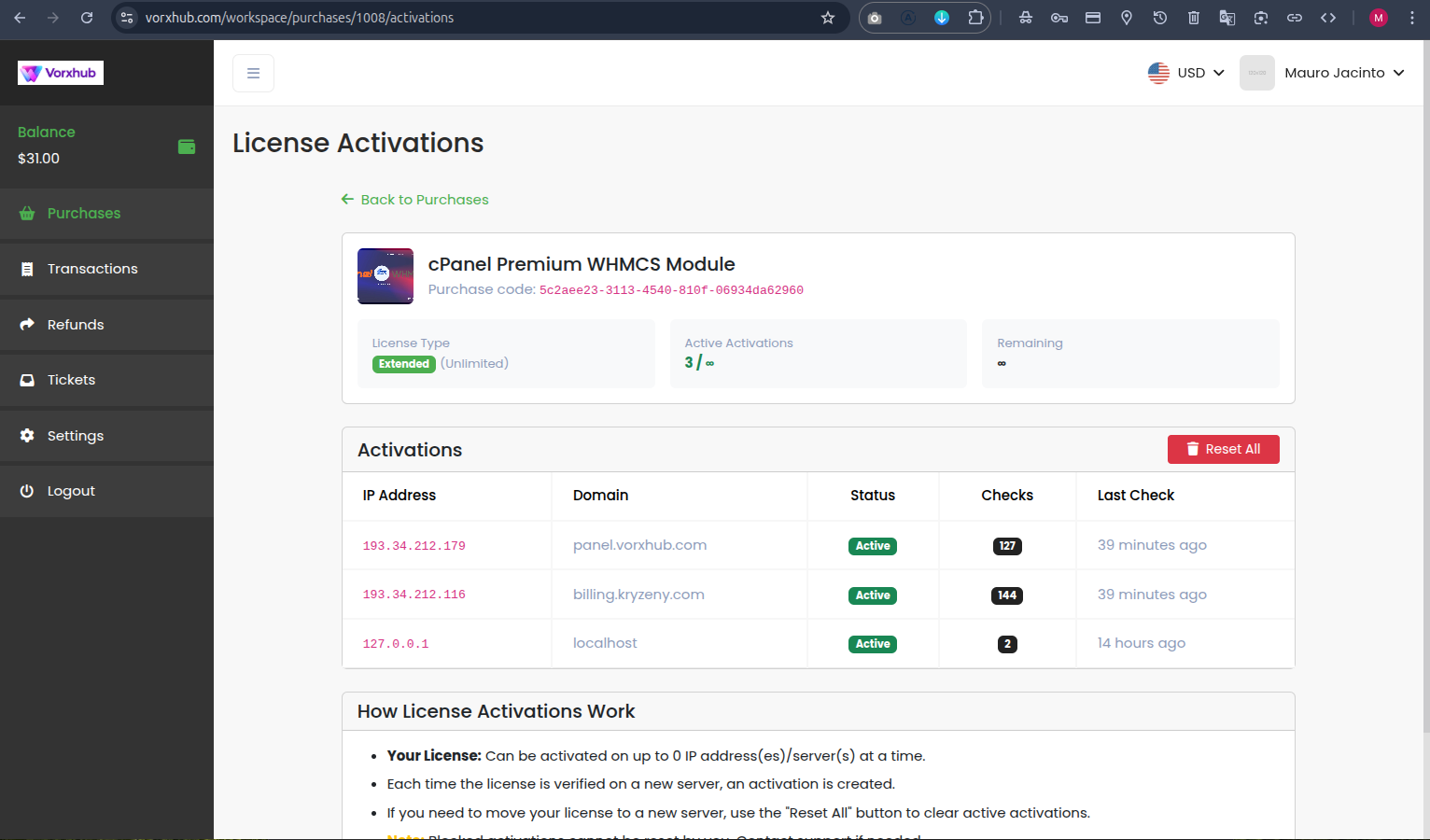
After resetting, you can activate the license on your new server/domain immediately.
You have full control over your activations. Reset anytime you need to migrate to a new server, change domains, or reinstall WHMCS.
By using cPanel Premium for WHMCS, you acknowledge that you have read and agree to this License Agreement.